
How To Create A Healthy Home Office
THE BALANCE BETWEEN COMFORT & HEALTH
Creating A Healthy Home Office
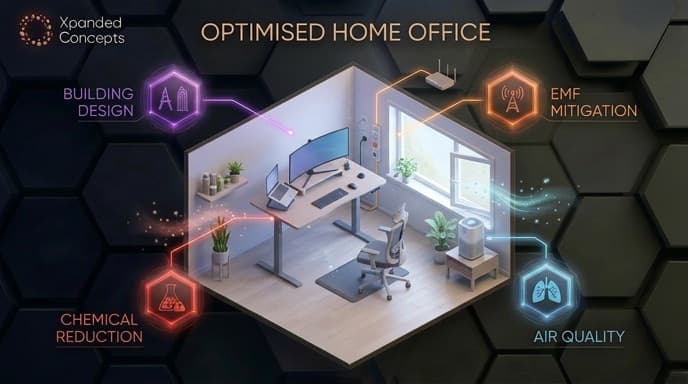
The home office presents a unique challenge from a building biology perspective. It is a space that for many people now rivals the bedroom in the sheer number of hours spent there, yet it receives a fraction of the attention. We invest in ergonomic chairs and standing desks, we think carefully about productivity and focus, but rarely do we ask what the space itself is doing to the biology of the person working in it. Poor air quality, elevated EMF from a concentration of devices, inadequate lighting and chemical off-gassing from furniture and finishes all accumulate in a space where someone may sit for eight or more hours a day, five days a week. From a building biology perspective, the home office deserves the same level of scrutiny as any other high-occupancy space in the home, and in many households, rather more than it currently gets.

Home Office Building Design
When thinking about building design from a building biology perspective, every room in the home has an ideal orientation that suits its function and the hours it is occupied. In a well considered home layout, the living space favours the north to capture winter sun and prevailing breezes, the bedroom favours the east for gentle morning light that supports a natural wake cycle, and wet areas - bathrooms, laundry, garage, are well suited to the west where the afternoon sun that would overheat a living space instead assists with drying and is largely wasted on rooms that don't need a quality light environment.
Read moreShow less
That leaves the south, and from a building biology perspective, the south facing orientation makes a strong case for the home office. Direct sunlight in a workspace is actually counterproductive. Glare on screens, heat load on an already device-dense room and the visual discomfort of managing intense direct sun through a working day all work against productivity and comfort. What a home office needs is not direct sun but generous, consistent, diffuse natural light, and a south facing room with well considered glazing delivers exactly that. Larger windows and glass areas on a south facing facade bring in abundant reflected and diffuse light without the heat, glare and seasonal variation of direct sun. The result is a workspace that feels bright and well lit throughout the day with none of the management that comes with direct solar exposure.
It is a counterintuitive idea for many people who instinctively favour sunny rooms, but for a space occupied for eight or more focused hours a day in front of screens, consistent diffuse light from the south is often the most comfortable and practical working light environment available.
Mould In The Home Office
The home office is generally a low mould risk environment. Unlike the bedroom, bathroom or kitchen it has no concentrated moisture source, no overnight breathing in a confined space, no steam, no cooking. From a moisture perspective it sits at the lower end of concern within the home.
Read moreShow less
That said, the same general principles that apply throughout the home apply here. A closed, poorly ventilated office that accumulates CO₂ through the working day is also accumulating humidity from the occupant's breath and any beverages in the space. Over time in a room with limited airflow, this background moisture load combined with a cold external wall or window can create the localised conditions that support mould, particularly in corners and behind furniture.

The more relevant mould consideration in a home office is often outdoor spores entering through windows opened for ventilation, and the air conditioning unit servicing the space. As covered in previous sections, a split system that is not regularly cleaned becomes a biological reservoir that distributes spores directly into the room every time it runs, a particular concern in a space where someone sits in the airflow for extended periods throughout the working day.
Read moreShow less
The approach here is simply good general habits, ventilate regularly, keep the AC unit clean, ensure furniture is not pushed against external walls, and address any signs of water ingress or dampness promptly. The home office does not require the focused mould management strategy of a bedroom or bathroom - it simply benefits from the same awareness applied consistently.

Home Office Air Quality
Air quality in the home office is shaped by a combination of factors that rarely exist together in quite the same way anywhere else in the home. It is a small, often closed room occupied by one person for extended periods, filled with electronic equipment, furnished with composite materials, and frequently containing a printer. Each of these elements contributes to the air quality environment of the space, and unlike the living room where people move in and out throughout the day, the home office occupant sits in that environment continuously, often for six to eight hours at a stretch. From a building biology perspective this concentration of time and sources makes air quality in the home office one of the higher priority considerations in the home.
Read moreShow less
Printer and Toner Emissions
Laser printers are one of the most significant sources of ultrafine particles in the home environment, and the home office is where they typically live. During operation, laser printers release ultrafine particles from the toner process as well as VOCs from heated plastic components. Ultrafine particles are particularly concerning from a health perspective because their small size allows them to penetrate deep into the respiratory system and enter the bloodstream. The problem in a home office is proximity. A printer sitting on or beside the desk places the occupant directly in the emission zone during every print job. In a closed, poorly ventilated room those particles have nowhere to go but into the breathing zone of the person working there.
Electronic Equipment Off-Gassing
Computers, monitors, cables, keyboards and plastic peripherals all off-gas VOCs from their casings and components, and do so at an accelerated rate when warm from extended use. A home office running a full computer setup for eight hours a day in a closed room generates a meaningful and continuous chemical contribution to the air quality of the space. Ensuring equipment has adequate ventilation and is not enclosed in tight cabinetry reduces heat buildup and the off-gassing that accompanies it.
Off-Gassing From Office Furniture
The home office is frequently one of the most chemically loaded rooms in the home for furniture. Desks, shelving, storage units and filing cabinets are commonly constructed from MDF and particleboard - among the highest sources of formaldehyde off-gassing in the home. Combined with new carpet or vinyl flooring, fresh paint and a closed door, a newly set up home office can have a chemical load that rivals a freshly renovated bedroom in its first months of use.
Studies Show Indoor Air Quality Can Affect Cognitive Function
CO₂ Buildup
Read moreShow less
CO₂ is the most significant and most overlooked air quality issue specific to the home office. Every breath exhaled raises the CO₂ concentration in the room, and in a closed office with a single occupant and limited ventilation, levels can climb to ranges that measurably impair cognitive function, concentration and decision making within just a few hours of starting work.
The insidious thing about elevated CO₂ is that it produces symptoms, mental fatigue, difficulty concentrating, a sense of heaviness or low motivation, that are almost universally attributed to something else. Most people assume they are tired, stressed or simply having an unproductive day. In many cases the room itself is the problem.
Outdoor CO₂ sits at around 420 parts per million. Research indicates that cognitive performance begins to decline at levels above 1000ppm, and deteriorates significantly above 1500ppm. A closed home office with a single occupant and no ventilation can reach and exceed these levels within two to three hours of starting work.
Mitigation Strategies
Monitor CO₂ levels
A combined CO₂ and humidity monitor is one of the most valuable tools in a home office. Watching CO₂ levels in real time makes the invisible visible - and most people find that seeing levels climb through the morning creates an immediate and lasting habit around ventilation. Keep CO₂ below 1000ppm as a working target.
Ventilate consistently throughout the working day
Open a window or door regularly to flush accumulated CO₂ and dilute VOCs. Even brief periods of airflow make a measurable difference. Where cross ventilation is possible - a window and an open door on opposite sides of the space - maintain this throughout the working day where outdoor conditions allow.
Relocate the printer
Move the printer out of the immediate workspace - into a hallway, adjacent room or dedicated area away from the desk. Print jobs become a brief visit rather than a sustained close-proximity exposure event. Ventilate the print area during and after use.
Choose low-VOC furniture and finishes
When setting up or upgrading a home office, prioritise solid timber desks and shelving over MDF and particleboard alternatives. Select low-VOC certified paints and finishes. Allow any new furniture to off-gas in a well ventilated space before bringing it into the office.
Allow new equipment to off-gas
New computers, monitors and peripherals off-gas most heavily in their first weeks of use. Where possible, run new equipment in a well ventilated space initially and ensure the office is well aired during this period.
Use a combined HEPA and activated carbon air purifier
A quality air purifier in the home office addresses both the particle load - ultrafine printer emissions, dust and allergens - and the chemical load from furniture and electronic off-gassing. Given the hours spent in the space and the concentration of sources present, it is one of the most justified investments in the home office environment. Position it between the printer and the primary seating position where possible.

EMF in the Home Office
The home office is the most device-dense room in the home. A typical setup might include a desktop computer or laptop, one or more monitors, a printer, a router or Wi-Fi extender, a phone, wireless peripherals, a smart speaker and various charging devices, all concentrated into a small room where one person sits in close proximity for eight or more hours a day. From an EMF perspective, no other room in the home combines this density of sources with this concentration of time in quite the same way. It is the room that most warrants a deliberate and considered approach to EMF management.
Sources of EMF in the Home Office
Wi-Fi router and extenders
Many home offices have a router or Wi-Fi extender placed nearby for signal strength - often directly on or beside the desk. A router positioned at desk level within arm's reach of the occupant represents one of the highest close-proximity RF exposures in the home. Signal strength and therefore exposure drops rapidly with distance, making router placement one of the most impactful and easily addressed EMF considerations in a home office.
Laptop and computer
Laptops are particularly relevant from an EMF perspective because of how they are used - directly on the lap or on a desk at close range, often connected simultaneously via Wi-Fi, Bluetooth and powered through a charging cable. This combination of RF and AC electric field exposure at very close proximity over extended hours represents a meaningful cumulative exposure.
Wireless peripherals
Wireless keyboards, mice, headphones and webcams all communicate via Bluetooth or RF continuously while connected. Each is a low-level source individually - but in combination, at close range, across a full working day, they contribute to the overall RF environment of the workspace.
Monitors and screens
Computer monitors generate AC electric and magnetic fields in their immediate vicinity. The standard advice of maintaining at least an arm's length distance from the screen is relevant here - and in a home office where screen size and desk depth are often chosen for convenience rather than considered placement, this distance is frequently less than ideal.
Cordless and mobile phones
A mobile phone kept on the desk throughout the working day - particularly one actively searching for signal, receiving notifications or connected to Wi-Fi - is a continuous RF source at close range. Many people charge their phone on the desk during work hours, combining RF exposure with the additional AC electric field of the charging cable.
Smart speakers and voice assistants
Increasingly common in home offices, smart speakers listen and transmit continuously. Positioned on or beside a desk where someone works for eight hours a day they represent an unnecessary and easily avoided source of close-proximity RF exposure.

KNOW YOUR ENVIRONMENT - THE VALUE OF EMF TESTING
Awareness is the foundation of any mitigation strategy, but awareness without measurement is guesswork. EMF fields are invisible and our senses give us no indication of their presence or intensity, which means two living spaces that look identical can have very different EMF environments depending on wiring, appliance placement, neighbouring properties and proximity to infrastructure. EMF testing takes the guesswork out of the equation entirely. It identifies the actual sources and levels present in your specific living space, allows mitigation efforts to be targeted where they matter most, and gives you a measurable baseline to work from. For anyone spending significant hours in a space, particularly families with young children understanding your actual exposure rather than assuming it is one of the most valuable steps you can take.


Chemicals In The Home Office
The home office is not typically thought of as a chemical environment. It is actually a room that quietly accumulates a subtle and largely invisible chemical load that most people never consider. A concentration of composite furniture, electronic equipment, synthetic flooring and printing materials in a small, frequently closed room creates a background chemical environment that, given the hours spent working there, is worth understanding. The concern here is not acute exposure, it is the cumulative effect of breathing a subtly elevated chemical load for eight or more hours a day, five days a week, year after year.
Office Furniture and Composite Materials
The home office desk, shelving, storage and cabinetry are among the most likely items in the entire home to be constructed from MDF or particleboard. These materials are among the highest sources of formaldehyde off-gassing available in the residential market, and a home office fitted out with a composite desk, bookshelf and storage unit represents a significant and continuous formaldehyde source in a small, enclosed space.
Formaldehyde is a known carcinogen and a respiratory irritant. It off-gasses most heavily from new materials but continues at lower levels for years. In a poorly ventilated home office occupied for eight hours a day, the cumulative exposure from composite furniture is worth taking seriously.
Flooring and Finishes
Synthetic carpet, vinyl and laminate flooring in a home office carry the same VOC considerations covered in the living room section, adhesives, synthetic fibres, surface treatments and backing materials all contribute to the background chemical load of the space. In a small room with limited ventilation these off-gas into a more concentrated air volume than in a larger living space, meaning the effective exposure per cubic metre of air is higher.
Electronic Equipment
Computers, monitors, cables, power boards and plastic peripherals all off-gas VOCs from their casings and components, and do so at an accelerated rate when warm. A full home office setup running for eight hours generates heat across multiple devices simultaneously, driving continuous off-gassing into the workspace air. This is compounded in setups where equipment is enclosed in desk hutches or cabinetry with limited airflow around the components.
Printer and Toner Chemicals
Beyond the ultrafine particle emissions covered in the air quality section, laser printers and their toner cartridges are a source of VOCs including styrene and other chemicals released during the printing process. Inkjet printers carry a lower particle emission profile but are not without their own chemical contribution. A printer operating in a small closed office adds to both the particle and chemical load of the workspace simultaneously.
Cleaning Products
The products used to clean desk surfaces, screens and flooring in a home office leave chemical residues that off-gas and accumulate in the room. Fragranced surface sprays, screen cleaning products and synthetic dusting sprays are among the more common VOC sources introduced through cleaning habits. Switching to fragrance-free, low-tox alternatives removes this as an ongoing contributor to the chemical environment.
MITIGATION STRATEGIES
Choose solid timber furniture over composite alternatives
When selecting or replacing home office furniture, solid timber carries a fraction of the formaldehyde off-gassing load of MDF and particleboard. It is a more durable, longer lasting and healthier choice for a room occupied for extended hours daily.
Seal composite surfaces where replacement is not practical
Where existing composite furniture cannot be replaced, sealing exposed edges and surfaces with a low-VOC hard wax oil or sealant reduces the rate of formaldehyde off-gassing meaningfully.
Select low-VOC flooring and finishes
Natural flooring options - solid timber, wool carpet, cork or tile - carry significantly lower chemical loads than synthetic alternatives. Low-VOC certified paints and finishes are widely available and a straightforward substitution.
Allow new equipment and furniture to off-gas before use
New computers, monitors, desks and peripherals off-gas most heavily in the first weeks after manufacture. Where possible, run new equipment in a well ventilated space and allow new furniture to air out before bringing it into the office.
Ensure adequate ventilation around electronic equipment
Avoid enclosing computers and monitors in tight cabinetry. Adequate airflow around equipment reduces heat buildup and the rate of off-gassing from warm plastic components.
Relocate the printer
As covered in the air quality section, moving the printer out of the immediate workspace reduces both particle and chemical exposure during print jobs.
Switch to fragrance-free, low-tox cleaning products
Remove synthetic fragrance from the office cleaning routine entirely. Fragrance-free alternatives clean equally effectively without the ongoing VOC contribution of synthetic fragrances.
Ventilate consistently
Fresh air is the most accessible and effective tool for diluting and displacing VOCs in a home office. Opening windows and doors regularly throughout the working day - and fully airing the space at the start and end of each working day - reduces the accumulated chemical load significantly.
Use an activated carbon air purifier
A combined HEPA and activated carbon air purifier addresses both the particle and chemical load of the home office environment. Given the concentration of off-gassing sources in a small, frequently closed room, activated carbon filtration is particularly valuable here - adsorbing VOCs from furniture, electronics and printing materials that ventilation alone may not fully resolve.
Dramatically Reduce VOC With Me

LIGHT IN THE HOME OFFICE
Of all the rooms in the home, the office is where lighting quality has the most immediate and measurable impact on daily function. It is a space where the eyes are under sustained demand, focused on screens, documents and fine detail for hours at a stretch and where the quality, colour temperature and consistency of light directly affects visual comfort, cognitive performance, eye health and by the end of the working day, the body's readiness for sleep.
THE PROBLEM WITH POOR OFFICE LIGHTING
Most home offices are lit as an afterthought - a ceiling light, whatever natural light the room receives, and a screen. This combination creates several problems that compound across a working day.
Glare and screen contrast
A bright overhead light or unmanaged window behind or beside a screen creates glare and contrast imbalance that forces the eyes to constantly readjust. Over hours this produces eyestrain, headaches and fatigue that is frequently attributed to screen time when the lighting environment is equally responsible.
Cool and blue-spectrum artificial light
Many home offices use cool white LED lighting - typically in the 4000K to 6500K range - which is high in blue spectrum output. While this supports alertness earlier in the day it becomes counterproductive as the afternoon progresses, suppressing melatonin at precisely the time the body should be beginning its wind-down toward evening. Someone finishing a working day under bright cool white office lighting and then moving directly to the living room or bedroom is carrying a significant blue light load into the evening hours.
LED flicker
LED flicker is a genuine concern in any room where extended time is spent - and the home office, with its sustained visual demands, is arguably where flicker has the most direct impact. Eyestrain and headaches that persist despite ergonomic screen positioning and regular breaks are worth investigating as a potential flicker issue in the office lighting.
Insufficient natural light
A home office that relies entirely on artificial light - whether by orientation, window size or habit - misses the circadian anchoring and alertness benefits of natural daylight exposure during working hours. Natural light is not just a comfort preference in a workspace - it is a biological input that supports focus, mood and sleep quality.

MITIGATION STRATEGIES
Maximise natural light without glare
Position the desk perpendicular to the primary window rather than facing it or sitting with it directly behind. This brings natural light into the workspace without creating screen glare or the contrast imbalance of a backlit environment. A south facing office with generous glazing - as discussed in the building design section - delivers consistent diffuse natural light throughout the day that is ideal for screen-based work.
Choose warm to neutral globes for artificial lighting
Select globes in the 2700K to 3500K range for the home office. This provides adequate light for focused work without the heavy blue spectrum output of cool white alternatives. Moving toward the warmer end of this range as the afternoon progresses supports the body's natural wind-down toward evening.
Use task lighting rather than relying solely on overhead light
A quality desk lamp directed at the working surface reduces the reliance on overhead lighting and allows more precise control of the immediate visual environment. Task lighting positioned to light documents and the desk surface without creating screen glare is significantly easier on the eyes than a single overhead source lighting the entire room uniformly.
Install a dimmer switch
A dimmer on the office overhead light allows lighting intensity to be reduced as the afternoon progresses - moderating blue light exposure and circadian disruption in the hours before the working day ends.
Invest in high quality low-flicker globes
For a room where eyes are under sustained demand for extended hours, globe quality matters more than anywhere else in the home. Choose reputable brands with documented low flicker performance. If unexplained eyestrain or headaches are a persistent issue in the home office, flicker is worth investigating as a primary cause.
Use blue light blocking glasses during screen work
As covered in the living room section, blue light blocking glasses are a practical and immediate mitigation strategy that works regardless of the light sources in the room. In a home office where lighting and screen exposure combine across a full working day, wearing blue light blocking glasses from mid-afternoon onward reduces the cumulative blue light load carried into the evening meaningfully.
Take regular breaks away from artificial light
Stepping outside or into a naturally lit part of the home during breaks serves two purposes - it provides genuine natural light exposure that supports circadian health and it gives the visual system a rest from the sustained close-focus demand of screen work. Even ten minutes outside during a lunch break makes a measurable difference to afternoon alertness and evening sleep quality.